Overview
Online card checkout has improved over the years, but it still has too many points of friction.
A customer may need to manually enter card details, correct typing errors, wait for an OTP, switch to a banking app, or retry authentication when something fails. Returning users often expect saved-card convenience, but saved card availability depends on whether the merchant has seen the user before, whether the card was saved with that merchant, and whether the user still trusts that stored credential.
Click to Pay changes this pattern by making network-tokenized cards available through a unified card checkout experience. With passkeys, the authentication step becomes even more seamless: instead of relying only on OTPs or app-switching, eligible customers can authenticate using device-native methods such as biometrics or device PIN.
For merchants, the value is practical:
- Faster checkout
- Fewer manual card entry errors
- Reduced dependence on OTP-only authentication
- Access to network-tokenized credentials
- Potential success-rate uplift through tokenized card payments
- A consistent card experience that can sit inside the existing checkout flow
Juspay's Unified Click to Pay implementation is designed to help merchants add this experience without rebuilding their payment stack. Merchants can integrate Click to Pay as part of Juspay Checkout, embed it into their card component, or use it as a modular authentication and credential discovery layer while continuing with their existing PSP, acquirer, or vault setup.
The Checkout Problem Merchants Still Need to Solve
Card payments remain one of the most important payment methods for online commerce, but the user experience is still inconsistent.
A typical card checkout can involve:
- Typing the card number, expiry, CVV, and billing details
- Correcting manual entry errors
- Waiting for OTP delivery
- Switching between browser, bank app, SMS, or email
- Retrying payment if authentication fails
- Saving the card again on another merchant's checkout
Each of these steps adds friction. Some users complete the flow. Some abandon. Some switch to another payment method. Some retry with another card.
For merchants, the impact shows up across checkout metrics:
- Card form start-to-submit rate
- Authentication initiation to completion rate
- Payment success rate
- Card-on-file usage
- Retry rate
- Drop-offs during OTP or challenge flows
- Customer support issues caused by failed or delayed authentication.
A better card checkout experience should not only make the UI look cleaner. It should reduce unnecessary user actions, improve credential quality, and fit into the merchant's existing payment architecture.
What Unified Click to Pay Brings to Checkout
Unified Click to Pay allows customers to use eligible tokenized cards from participating card networks through a common checkout experience.
Instead of entering card details manually, the customer can see eligible cards, select the preferred card, and complete authentication through a supported method. When passkeys are available, the authentication step can be completed through device-native verification such as Face ID, fingerprint, or device PIN.
At a product level, Unified Click to Pay brings together four capabilities:
1. Card discovery
The customer can access eligible Click to Pay cards during checkout, even when the merchant does not already have that card saved locally.
2. Network tokenization
The transaction can use network-tokenized credentials instead of relying only on raw card-on-file credentials.
3. Passkey-based authentication
Eligible users can authenticate with a device-native passkey experience instead of depending only on OTPs or app-switching.
4. Checkout integration
The Click to Pay experience can be blended into the merchant's existing card checkout instead of being presented as a disconnected payment button.
Why This Matters for Merchants
Faster checkout
Click to Pay reduces the need for customers to manually enter card details. Passkeys reduce the friction of authentication. Together, they shorten the path from "I want to pay" to "payment completed".
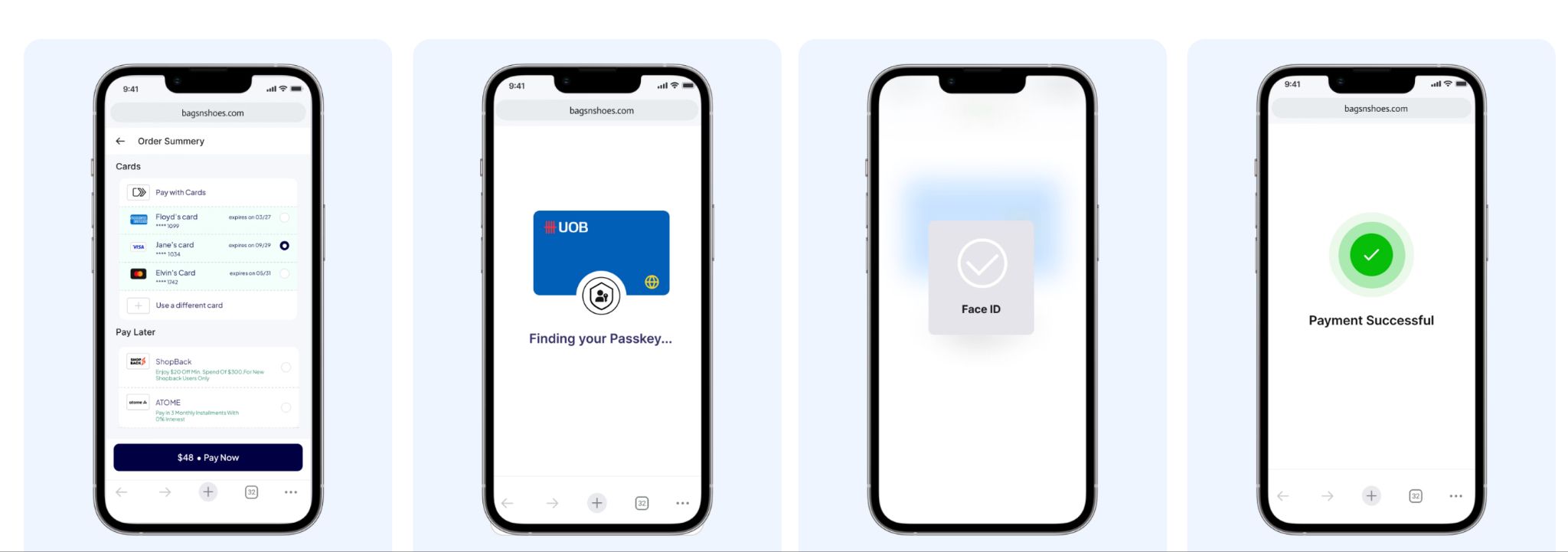
A simpler flow looks like this: customer reaches checkout, eligible C2P cards are shown, customer selects card, passkey authentication, payment continues through merchant flow, payment success.
The important point is not that the user sees a new payment method. The important point is that the card experience becomes faster and more reliable.

Fewer manual card entry errors
Manual card entry is a source of avoidable friction. Customers mistype card numbers, expiry dates, CVVs, names, and billing information. These errors create retries before the payment even reaches authentication or authorization.
Click to Pay reduces this dependency on manual entry by surfacing eligible cards directly in checkout. The customer selects the card instead of re-entering it.
This helps merchants reduce:
- Form errors
- Failed submissions
- Card detail correction loops
- Drop-offs before payment initiation
Seamless passkey authentication
Passkeys make authentication feel closer to unlocking a device than completing a payment challenge.
When passkeys are available, the customer can authenticate using biometrics or device PIN. This removes dependence on slow OTP delivery, app switching, or remembering another password.
A typical passkey-enabled flow runs end-to-end as follows:
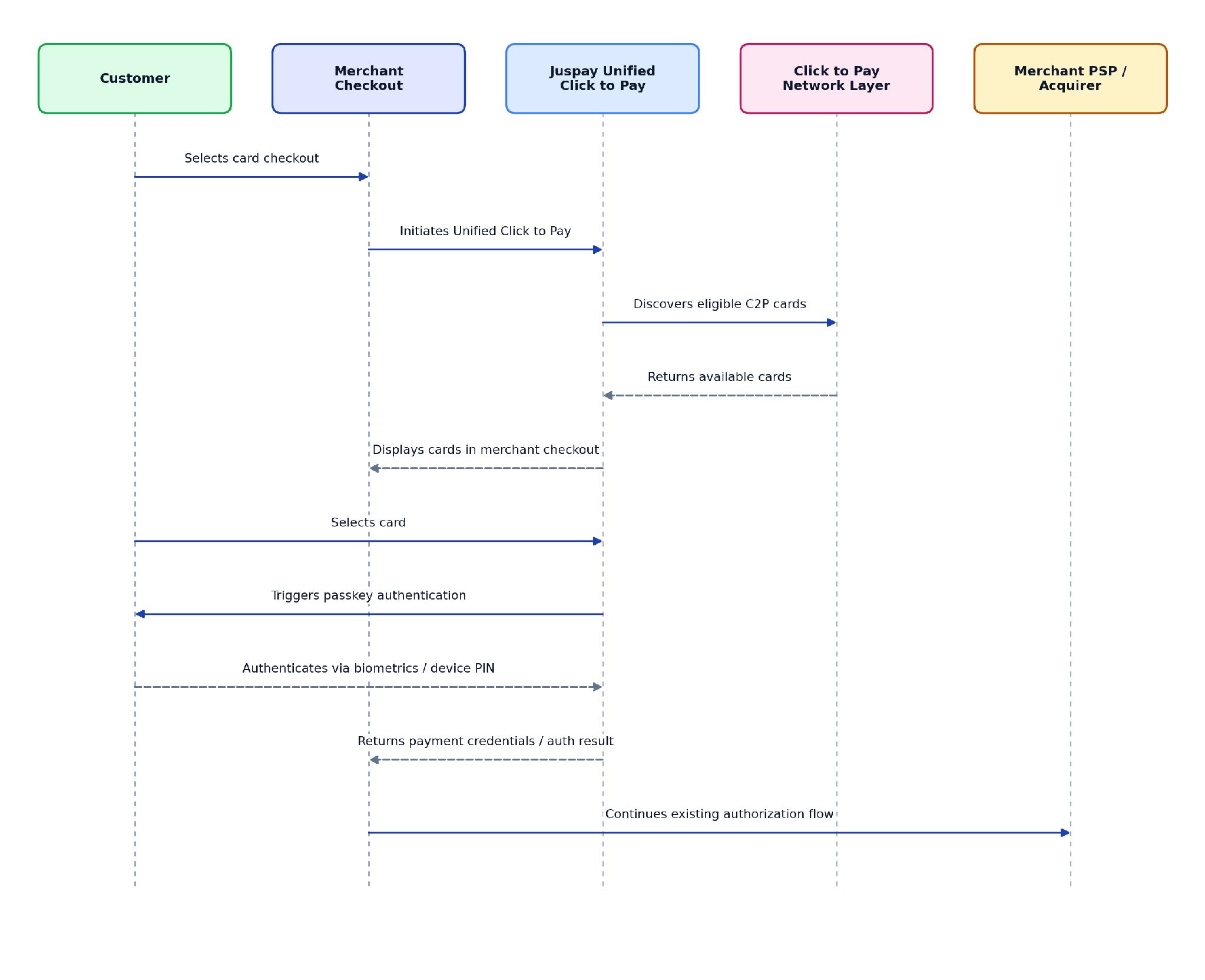
If passkeys are not available for a customer or device, the flow can fall back to supported OTP-based authentication. The fallback should be treated as a continuity path, not the primary experience.
Better credential quality with network tokenization
Network tokenization replaces raw card credentials with network-issued tokens. For merchants, this can improve the quality and resilience of card credentials used in checkout.
Compared with manually entered PANs or merchant-specific card-on-file credentials, network tokens can help with:
- Improved credential lifecycle management
- Reduced exposure of raw card data
- Better continuity when cards are reissued
- Potential payment success-rate uplift where network tokens are supported and optimized
The core merchant benefit is simple: Click to Pay can increase the use of tokenized card credentials in checkout, which can improve the payment experience beyond the UI layer.
Higher saved-card coverage
Merchant saved cards work well when the customer has previously saved a card with that merchant. But many customers arrive as guests, new users, or users whose saved cards are outdated.
Click to Pay can help merchants show eligible cards that are already available through the customer's network-backed profile. This gives the merchant a saved-card-like experience even when the merchant does not already have that card stored locally.
That means the checkout can feel familiar and fast for more customers, not only repeat customers with merchant-stored cards.
How Juspay Enables Unified Click to Pay
Juspay's approach is to make Click to Pay available as a checkout capability that fits into the merchant's current architecture.
The goal is not to force a merchant to replace its payment stack. The goal is to add Click to Pay, passkey authentication, and tokenized card discovery with minimal changes to existing business-as-usual payment flows.
1. Modular integration with existing merchant flows
Many merchants already have a preferred PSP, acquirer, vault, fraud system, and authorization flow. Replacing that stack only to enable Click to Pay creates unnecessary implementation friction.
Juspay supports a modular approach where Click to Pay can be added for card discovery and authentication, while the merchant continues authorization through its existing PSP or acquirer.
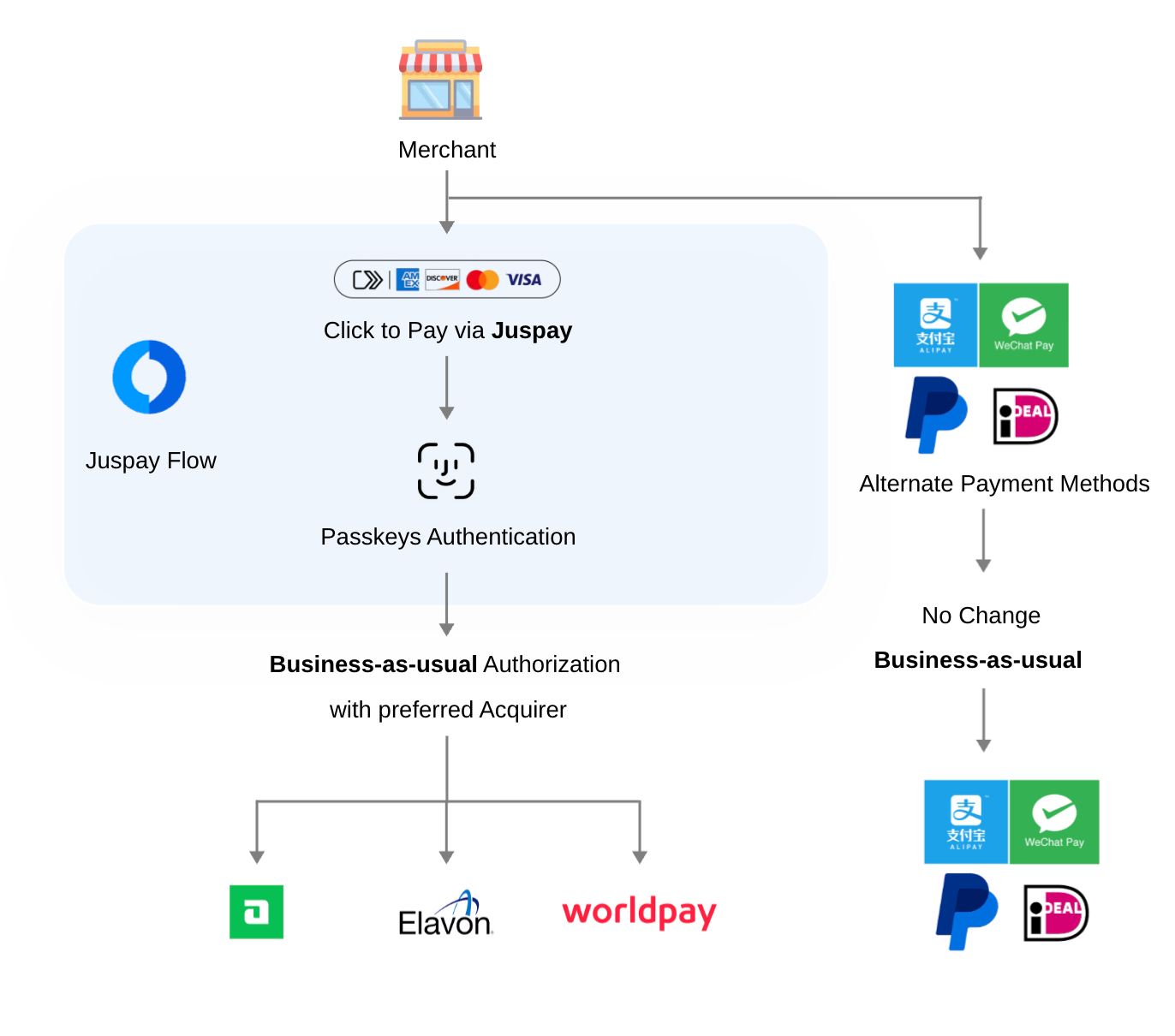
This allows the merchant to keep the rest of the payment setup intact.
Other payment methods can continue as they are. Existing routing, reconciliation, reporting, fraud checks, and PSP relationships do not need to be redesigned only to introduce Click to Pay.
2. Multiple integration options
Different merchants need different integration depths.
A merchant that wants Juspay to manage the checkout experience may prefer a hosted checkout SDK. A merchant with an existing card component may prefer an embeddable widget. A platform merchant may prefer a plugin. A mobile-first merchant may need web and native SDK options.
Juspay supports multiple integration paths:
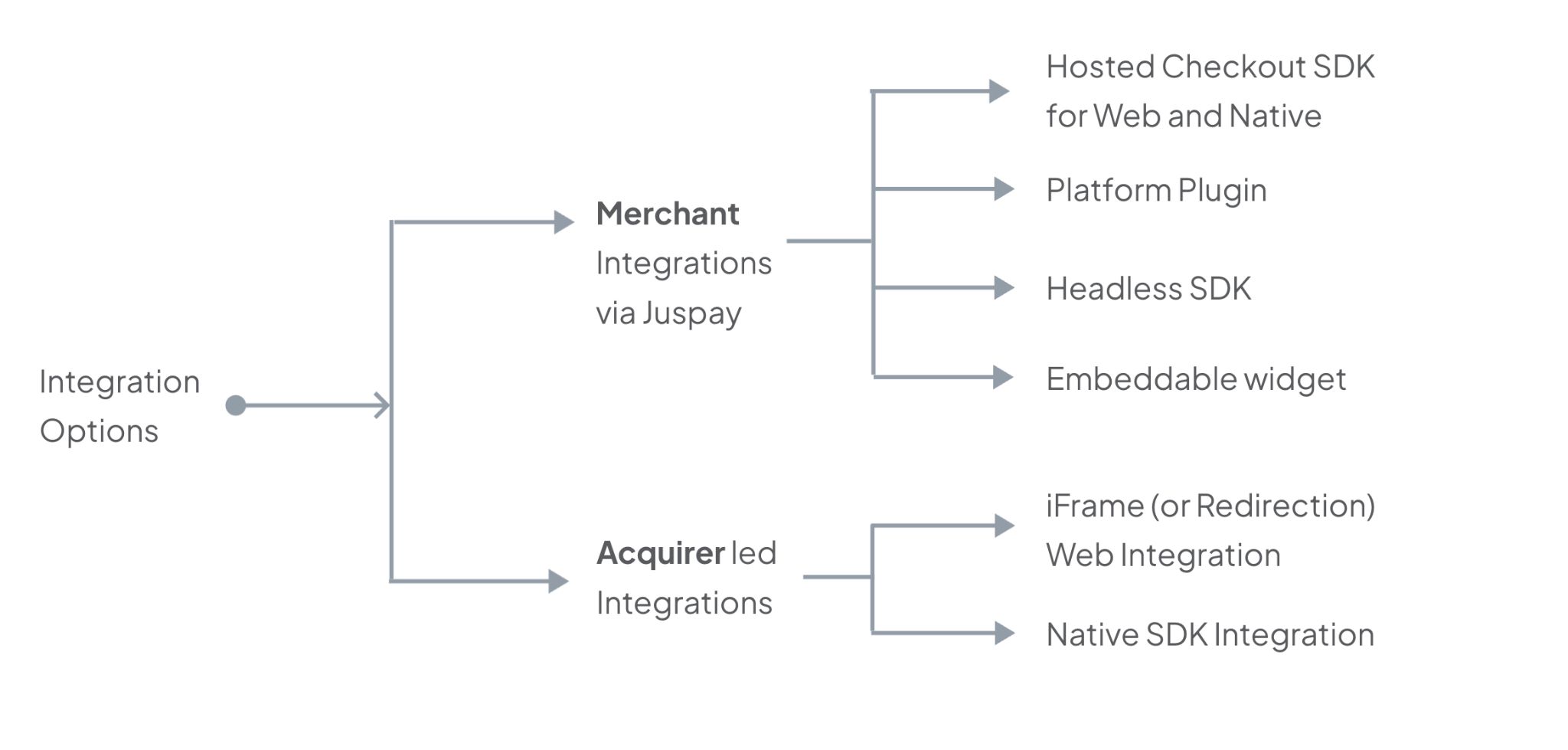
Hosted Checkout SDK: Best for merchants that want Juspay to manage the payment page experience. The Hosted Checkout SDK can present Click to Pay alongside other payment methods, saved cards, and checkout configurations. This is suitable when the merchant wants a faster go-live path and less UI ownership.
Platform Plugin: Best for platform-led or commerce-platform merchants that want a lower-effort integration path. A plugin-based approach can help merchants enable Click to Pay without significant engineering changes to their existing storefront or checkout setup.
Embeddable Widget: Best for merchants that already have a mature checkout UI and want Click to Pay inside the existing card journey. The widget can be embedded into the card component so Click to Pay feels like part of the merchant's checkout rather than a separate redirect or external button.
iFrame or Redirection: Best for merchants that want a contained integration model. This can be useful when the merchant wants to isolate parts of the Click to Pay experience while still making it available within the checkout journey.
Web and Native SDK Integration: Best for merchants that want deeper control over the customer experience across browser and app contexts. This allows Click to Pay to be designed into the merchant's web, mobile web, and app checkout flows with a more native-feeling experience.
3. Blended card UX
A common issue with new payment experiences is that they appear as separate buttons, banners, or redirects. That can create confusion, especially when customers are already familiar with the merchant's card checkout.
Juspay's Click to Pay experience is designed to blend into the card component.
This means Click to Pay can appear alongside:
- Merchant saved cards
- Card entry
- Card-on-file options
- Other configured payment methods
- Guest checkout flows
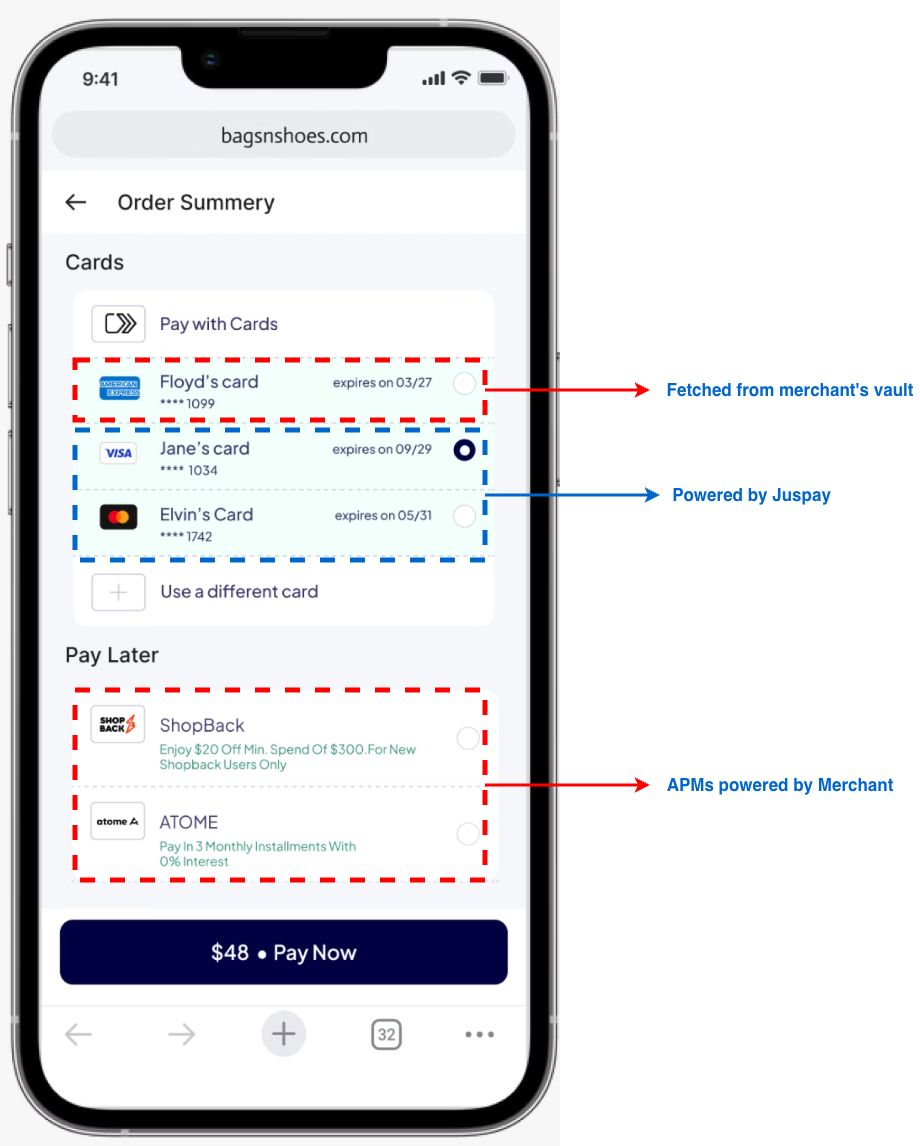
The customer does not need to understand whether the card came from the merchant vault, a network-backed Click to Pay profile, or another credential source. The checkout simply presents the best available card options in a consistent experience.
4. Credential handoff to the merchant's existing payment stack
Merchants differ in how they handle payment credentials.
Some merchants are PCI compliant and can receive credentials directly. Some prefer credentials to be pushed to their PSP. Others use a third-party vault such as VGS and want the credential to be stored or passed through that vault.
Juspay's integration model can support these merchant-side choices: push to PSP, push to PCI-compliant merchant, or push to a merchant vault such as VGS, before continuing to authorization.
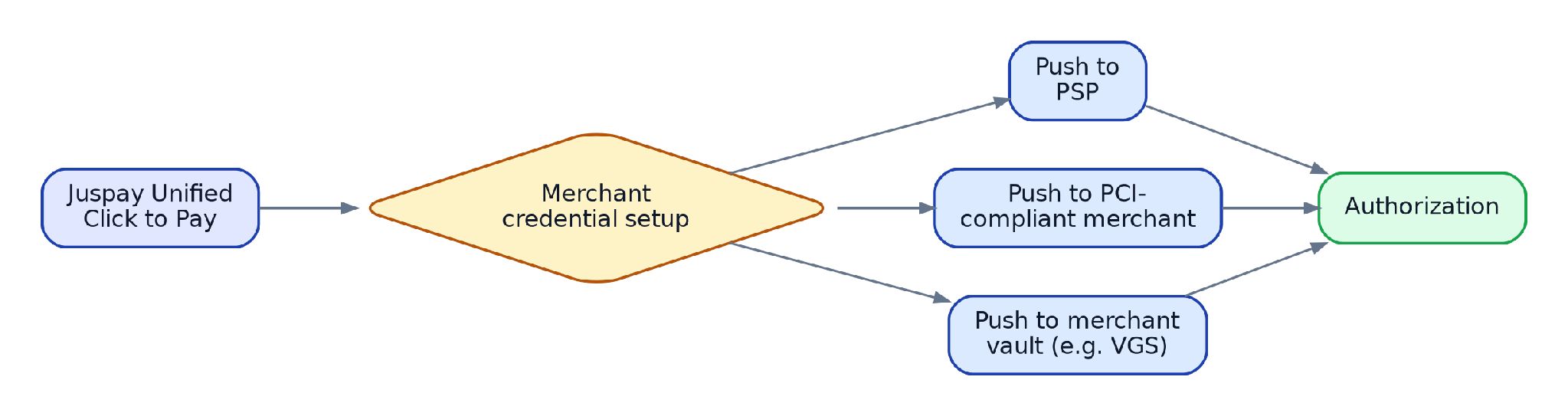
This is important because Click to Pay should not force a new credential architecture. The merchant should be able to fit the credential flow into its existing PCI scope, PSP relationship, and vaulting strategy.
5. Minimal changes to business-as-usual authorization
A merchant may want the customer-facing benefits of Click to Pay but may not want to change authorization, settlement, reconciliation, or PSP routing immediately.
Juspay's modular flow allows the merchant to use Click to Pay for discovery and authentication, then continue with its existing authorization flow.
This creates a clean separation:
| Layer | What changes | What can remain unchanged |
| Checkout UX | Click to Pay cards can be shown in the card component | Overall checkout structure can remain the same |
| Authentication | Passkey authentication can be introduced where supported | OTP fallback can remain available |
| Credentials | Network-tokenized credentials can be used | Merchant's PSP or vault setup can remain intact |
| Authorization | Merchant can continue BAU authorization | Existing PSP / acquirer relationship can continue |
| Other payment methods | No forced change | Existing APMs can continue as-is |
This is the key merchant benefit: Click to Pay can be added as a modular capability instead of a full payment migration.
6. Analytics for checkout and payment teams
Click to Pay should not be treated as a black box. Merchants need visibility into how the experience performs across the funnel.
Juspay can provide analytics across the Click to Pay journey, helping payment teams understand where users are converting, dropping off, or falling back.
Useful analytics views include:
- Click to Pay eligibility rate
- Card discovery success rate
- Click to Pay card selection rate
- Passkey availability rate
- Passkey authentication success rate
- OTP fallback rate
- Authentication abandonment rate
- Payment authorization success rate
- Tokenized credential usage
- Comparison of Click to Pay versus manual card entry
- Device, browser, region, and issuer-level performance cuts where available

This allows merchants to answer practical questions:
- Are customers seeing Click to Pay cards?
- Are they selecting them?
- Is passkey authentication working well?
- Where are users falling back to OTP?
- Does tokenized card usage improve success rates?
- Which devices or browsers need optimization?
The value is not just enabling Click to Pay. The value is being able to operate and improve it.
Recommended Merchant Implementation Pattern
For most merchants, Unified Click to Pay should be introduced as an enhancement to the existing card journey, not as a separate payment method competing for attention.
A practical implementation sequence:
Step 1 - Add Click to Pay discovery into the card component: Show eligible Click to Pay cards inside the card section of checkout, alongside saved cards and new card entry.
Step 2 - Enable passkey authentication where supported: Use passkeys as the preferred authentication experience for eligible users and devices.
Step 3 - Keep OTP fallback available: If passkeys are not supported or authentication cannot be completed, fall back to supported OTP authentication.
Step 4 - Continue existing authorization flow: Send the resulting credential or authentication output to the merchant's existing PSP, PCI-compliant backend, or vault setup.
Step 5 - Monitor the funnel: Track card discovery, card selection, passkey authentication, OTP fallback, authorization success, and drop-offs.
What a Good Merchant Experience Looks Like
A well-designed Unified Click to Pay implementation should feel invisible to the user and non-disruptive to the merchant's payment stack.
For the customer
- Eligible cards appear automatically
- No manual card entry is needed when a Click to Pay card is available
- Authentication happens with biometrics or device PIN where supported
- OTP fallback exists when needed
- Checkout feels consistent with the merchant's brand
For the merchant
- Click to Pay fits into the existing card component
- Existing PSP / acquirer authorization can continue
- Credentials can be handed off to the PSP, merchant backend, or vault depending on PCI setup
- Other payment methods remain unchanged
- Payment teams get analytics to evaluate performance
Why This Is a Meaningful Upgrade to Card Checkout
Unified Click to Pay is not just another checkout button. It changes how card credentials are discovered, authenticated, and used.
It gives merchants a way to offer a saved-card-like experience to more customers, reduce manual entry, use network-tokenized credentials, and introduce passkey authentication without rebuilding the entire payment stack.
The best implementation is modular: add Click to Pay where it improves the card journey, keep existing payment flows where they already work, and use analytics to optimize the funnel over time.
That is the role Juspay plays: bringing Click to Pay into the merchant's checkout in a way that is configurable, measurable, and compatible with the merchant's existing payment architecture.