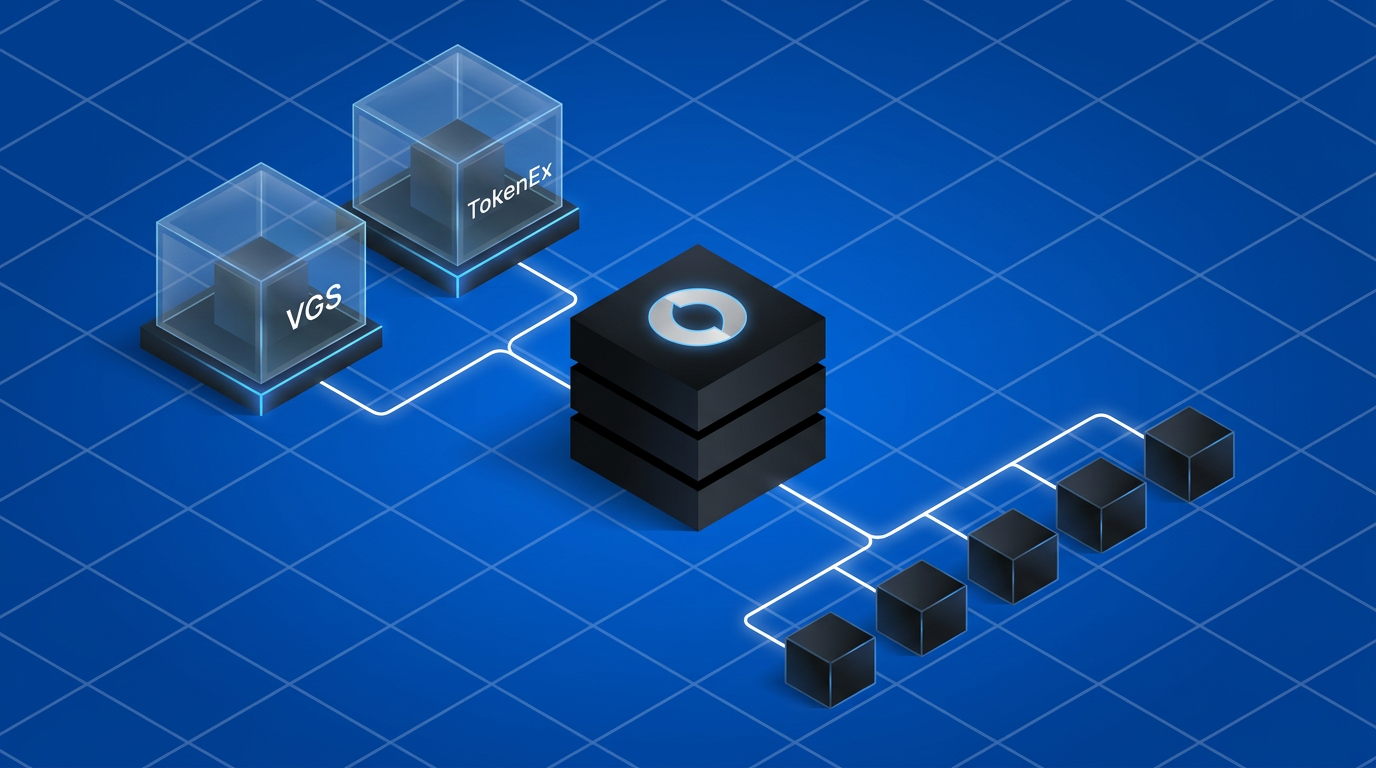
In a payment orchestration stack, the vault sits upstream of every PSP integration, not inside one. When Juspay Hyperswitch routes a card payment through Adyen, Stripe, or Worldpay, it does not decide where the raw PAN lives while processing the payment. That decision was made before the payment call during the initial configuration and setup itself. The vault, whether VGS, TokenEx, or Hyperswitch's own built-in store, is the system that holds the PAN and hands the calling entity (merchant or payment orchestrator) a token. The calling entity holds the token and hands the PSP a payment request for processing. These are separate concerns operating across a clean boundary, and conflating them is how teams end up locked into a single PSP.
This post covers the two external vault architectures Hyperswitch supports: VGS and TokenEx. It also details where exactly the boundary sits between the vault, the payment orchestrator, and the downstream processor.
Why the vault sits outside the payment orchestration stack
Hyperswitch ships with a built-in PCI-compliant vault. For most merchants, it is the right default: card capture, storage, tokenization, and network token lifecycle are all managed without additional integration. You get a payment_method_id back from the first transaction, and every subsequent payment across any PSP Hyperswitch routes to uses that ID without re-collecting card data.
External vaults serve a different need. If your card data already lives in VGS or TokenEx from a prior integration, a different payment system, a compliance decision your team made years ago, or you simply wish to have different vendors for orchestration and card storage. You connect Hyperswitch with your existing vault provider. Hyperswitch can continue powering the payment experience SDK and collect the PAN while using VGS or TokenEx to store the card and retrieve a vault token. The merchant may even wish to use VGS or TokenEx to power the checkout. The vault token becomes the handoff point in this case. Hyperswitch never touches the PAN. This is also the architecture that delivers PCI-DSS scope reduction for self-hosting merchants: raw card data enters the vault directly from the payment SDK (bypassing your servers entirely), and Hyperswitch operates only on vault-issued tokens issued by VGS or TokenEx and PSP requests/responses.
Architecture overview
Both VGS and TokenEx follow the same three-layer pattern when integrated with Hyperswitch:
1. Vault as storage
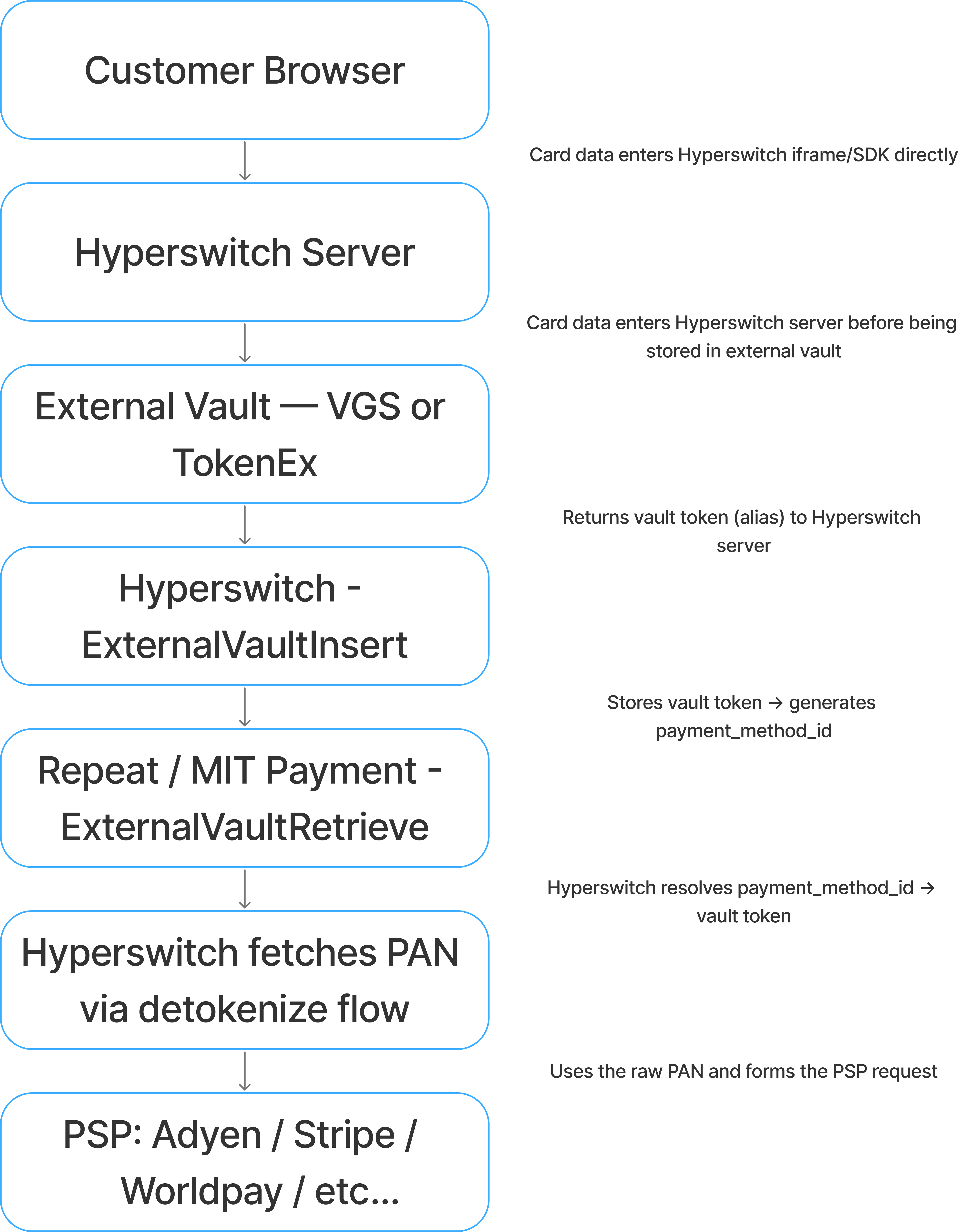
Detokenization is the critical component for this flow. The underlying PSPs do not understand vault token. The vault token is exchanged for the raw card between Hyperswitch and the external vault (VGS or TokenEx). The raw PAN is then used to make the outbound PSP request inside the Hyperswitch core orchestration layer, after Hyperswitch has already made its routing decision.
2. Vault as experience and storage
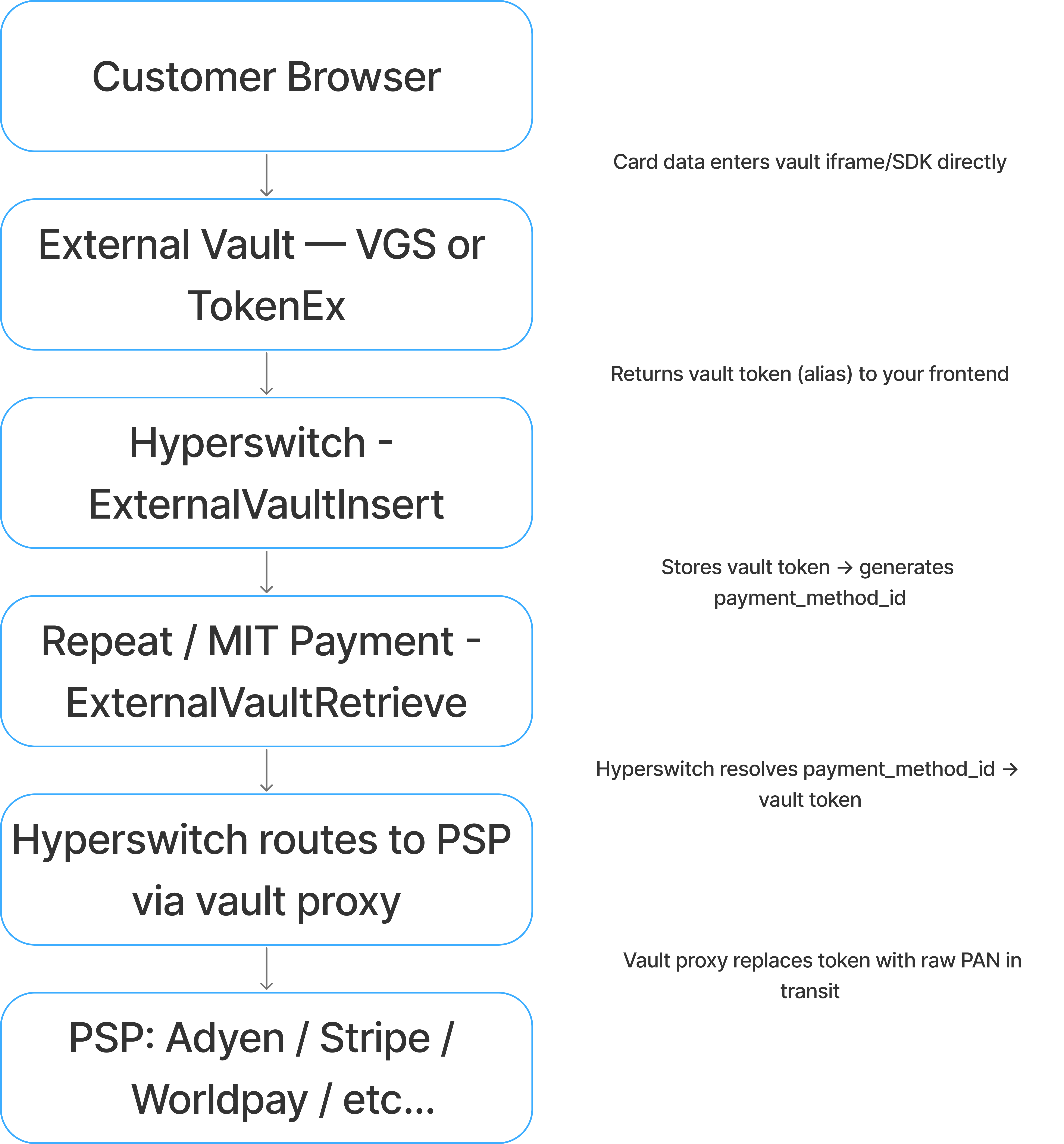
Vault proxy is the critical component. Neither Hyperswitch nor your server ever sees the PAN in plaintext. The raw card data is swapped into the outbound request inside the vault's proxy layer, after Hyperswitch has already made its routing decision.
| PCI with Hyperswitch stack | Outsource PCI to vault | |
| Hyperswitch SDK | Collects card data, detokenizes, then calls PSP | Not possible |
| Vault element inside Hyperswitch SDK | Not possible | Uses vault proxy flow before calling PSP |
| Vault provider's SDK | Merchant sends vault token with Hyperswitch request → Vault's outbound proxy → Hyperswitch receives raw PAN | Merchant sends vault token with Hyperswitch request → Hyperswitch endpoint → Hyperswitch sends vault token with PSP request → Vault proxy substitutes token with raw PAN → Forwards to PSP |
VGS integration architecture: vault as experience and storage
VGS operates as a bidirectional proxy. It exposes two route types: inbound routes that intercept card data on the way in and replace it with a VGS alias, and outbound routes that intercept PSP-bound requests and swap the alias back for raw PAN before forwarding.
Card capture and tokenization
The VGS Collect JavaScript library renders card input fields inside an iframe hosted on VGS's infrastructure. From the browser's perspective it renders as a normal form. From a PCI compliance perspective, the card data never touches the origin server.
When the customer submits, VGS's inbound route captures the raw PAN, stores it in the vault, and returns an alias in the format: tok_sandbox_9ToIBEHQnSMUKnJM5nCiGH
Production aliases follow the same structure with a different prefix. The alias is format-preserving by default i.e. it retains the length and structure of the original card number, which matters for downstream validation checks.
Submitting payments through the VGS outbound proxy
When Hyperswitch routes a payment to Adyen or Stripe, it sends the PSP formatted request through VGS's outbound forward proxy URL rather than directly to the PSP endpoint. VGS intercepts the request, identifies the alias in the payload, replaces it with the raw PAN, and forwards the request to the PSP. In this cases the Hyperswitch system never sees the raw PAN.
Another possibility here is where the merchant stores the VGS token, forms the Hyperswitch request and uses VGS outbound proxy to send the transaction to Hyperswitch with raw PAN in it. Hyperswitch then sends the request to the right PSP based on merchant configurations and real-time PSP signals. In this case the Hyperswitch system received the raw PAN from the VGS vault.
In either of the above cases, the merchant maintains only the Hyperswitch unified API while sending the request with the VGS token directly to Hyperswitch or via the Outbound proxy endpoint. The preferred form of integration depends on the level of PCI scope a merchant wishes to take. While a Hyperswitch SaaS merchant may not care about these options, they become particularly relevant for self-hosting merchants trying to avoid PCI scope.
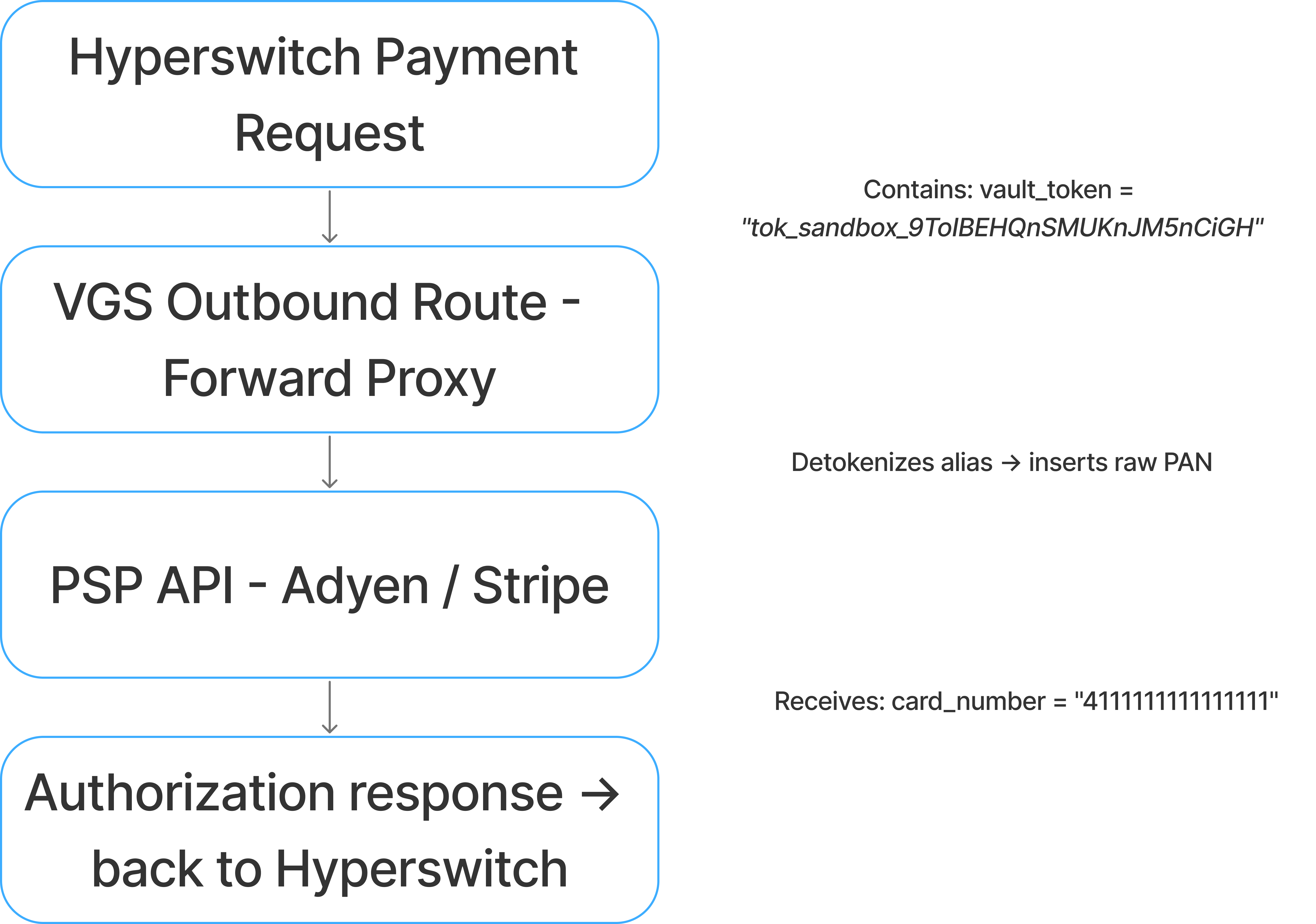
The PSP receives a standard authorization request. It is unaware of the vault proxy in the path.
Configuring VGS in Hyperswitch
VGS is configured as a connector under Orchestrator → Connector → Vault Processor in the Hyperswitch dashboard. Authentication uses SignatureKey. Three values are required:
| Field | Value |
| Username (API Key) | VGS OAuth2 client ID |
| Password (Key1) | VGS OAuth2 client secret |
| Vault ID (API Secret) | Your VGS vault identifier, format tntYYYYYYYY |
Hyperswitch uses the client ID and secret to obtain a Bearer token from VGS's OAuth2 token endpoint before every vault operation. The vault ID routes operations to your specific vault tenant.
ExternalVaultInsert stores the alias and returns a payment_method_id. ExternalVaultRetrieve resolves the payment_method_id back to the alias when a payment is initiated.
VGS boundary statement
VGS owns: the raw PAN storage, the inbound route that generates the alias, and the outbound proxy that detokenizes the alias before PSP submission.
Hyperswitch owns: the routing decision (which PSP, which capture method, which retry logic), the payment_method_id that links a customer to their stored payment method, and the orchestration of every downstream flow after the vault token is resolved.
The VGS alias is the only artifact that crosses this boundary. Hyperswitch does not read PANs. VGS does not make routing decisions.
VGS integration architecture: vault as storage
VGS can also be integrated as just storage where the experience is powered by Hyperswitch. In this case there are two possibilities. Hyperswitch powers the entire checkout experience including the card element. In this case the raw PAN enters the Hyperswitch system and then gets stored/tokenized with VGS. The other option is where the Hyperswitch SDK loads the VGS card SDK and the actual card is entered in the VGS SDK. In this case the raw PAN never enters the Hyperswitch system and it only receives the VGS token. These options allow Hyperswitch to power all non-card payment methods like BNPLs, wallets, bank transfers and more. The SDK possibilities are not relevant for a Hyperswitch SaaS user but are key for self-hosting users trying to avoid PCI compliance.
TokenEx integration architecture: vault as experience and storage
TokenEx takes a different proxy model. Rather than bidirectional route interception, TokenEx exposes a Transparent Gateway, a pass-through proxy endpoint that detokenizes the card token inline as it forwards your request to the PSP. The merchant configures the PSP's API endpoint inside TokenEx's gateway, and TokenEx handles the substitution transparently.
Card capture and tokenization
TokenEx provides an iFrame-based card capture component similar to VGS Collect. The iFrame is hosted on TokenEx infrastructure. Card data entered by the customer is submitted directly to TokenEx's Tokenize API.
TokenEx Tokenize API
POST https://api.tokenex.com/TokenServices.svc/REST/Tokenize
{
"TokenExID": "your_tokenex_id",
"APIKey": "your_api_key",
"TokenScheme": "PCI",
"Data": "4111111111111111"
}
Response:
{
"Token": "4111XXXXXXXXXX1111",
"Referencenum": "17123456789",
"Success": true,
"Error": ""
}
TokenEx supports multiple token schemes. The PCI scheme preserves the first six and last four digits of the card number, matching the format a merchant's system expects for BIN-level routing and display. The GUID scheme returns an opaque UUID. The TOKENEXfirst6last4 scheme is an alias for the same format-preserving behavior. The token is what gets passed to Hyperswitch. The raw PAN never leaves TokenEx.
Submitting payments through the TokenEx Transparent Gateway
TokenEx's Transparent Gateway operates as a forward proxy. You configure it with your PSP's API endpoint. When Hyperswitch (or your backend) sends a payment request containing the TokenEx token, the gateway intercepts it, substitutes the raw PAN, and forwards the modified request to the PSP or Hyperswitch.
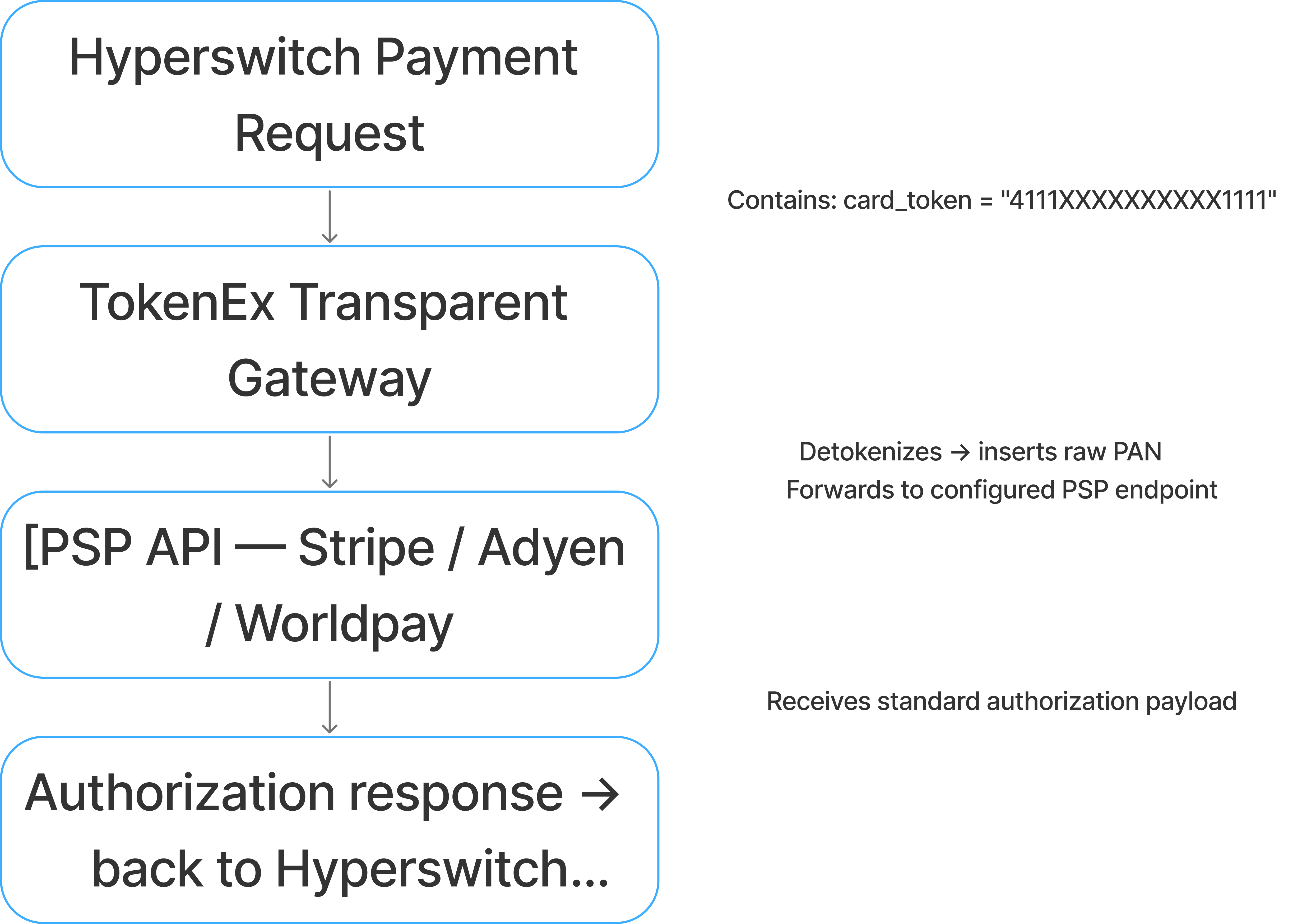
The key distinction from VGS: TokenEx's outbound proxy is configured at the gateway level (the PSP URL is registered inside TokenEx's dashboard), whereas VGS's outbound route is configured as a route rule within VGS's proxy layer. Both achieve the same result, the PSP receives a raw PAN but the configuration surface differs.
Configuring TokenEx in Hyperswitch
TokenEx is configured as a vault connector in Hyperswitch under Orchestrator → Connector → Vault Processor.
| Field | Value |
| TokenEx ID | Your unique TokenEx account identifier |
| API Key | TokenEx API key for server-to-server calls |
| Token Scheme | Configured token format (e.g., PCI, GUID) |
ExternalVaultInsert accepts the TokenEx token and card metadata (expiry, cardholder name) and creates a payment_method_id. On subsequent payments, ExternalVaultRetrieve resolves the payment_method_id to the TokenEx token, which is then routed through the Transparent Gateway to the PSP.
TokenEx boundary statement
TokenEx owns: the raw PAN storage, the tokenization scheme applied to it, and the Transparent Gateway that substitutes the token with raw card data during PSP submission.
Hyperswitch owns: the payment_method_id that maps a customer and a payment method to a TokenEx token, the routing logic that selects the PSP, and the retry and orchestration flows that run on top of every PSP response.
The TokenEx token is the only handoff point between the two systems. Hyperswitch does not need to know the PSP's URL — TokenEx's gateway resolves that. TokenEx does not need to know Hyperswitch's routing logic — it receives a request and proxies it.
Choosing between Hyperswitch vault, VGS, and TokenEx
All of them sit in the same architectural position relative to Hyperswitch. The choice is driven by the existing vault relationship and PCI posture (if you're self-hosting): If your card data already lives in VGS or TokenEx, you do not migrate. You configure Hyperswitch to use the existing vault. Migrating vaults without a re-collection event requires working with the existing provider's export and re-tokenization service which adds operational overhead.
What breaks — failure modes
VGS outbound route not configured for the PSP endpoint
Symptom: Authorization request reaches the PSP containing the VGS alias (tok_sandbox_xxxx) rather than a raw PAN. The PSP returns a hard decline — typically invalid card number or a BIN validation failure.
Root cause: The VGS outbound route filters on destination hostname. If the PSP endpoint is not in the route's allowed destination list, VGS passes the request through without detokenization.
Fix: In the VGS dashboard, verify the outbound route's destination filter includes the exact PSP API hostname. For Adyen, this is checkout-test.adyen.com (sandbox) or checkout.adyen.com (production). For Stripe, it is api.stripe.com. Every PSP endpoint Hyperswitch routes to must be covered by a VGS outbound route.
TokenEx Transparent Gateway URL misconfigured
Symptom: Payment request reaches the PSP without detokenization. The PSP receives the TokenEx token string as the card number and declines with a format validation error.
Root cause: The TokenEx Transparent Gateway uses the destination URL registered in your TokenEx dashboard to determine where to forward the detokenized request. If the URL is mismatched — for example, a sandbox URL registered but a production URL used — the gateway cannot match the request and passes it through without substitution.
Fix: In your TokenEx dashboard under Transparent Gateway configuration, verify the registered PSP endpoint matches the URL Hyperswitch sends requests to. Sandbox and production require separate registrations.
VGS OAuth token expired during ExternalVaultRetrieve
Symptom: ExternalVaultRetrieve fails with a 401 response from VGS. The payment attempt fails before reaching the PSP.
Root cause: Hyperswitch fetches a VGS OAuth Bearer token using your client ID and secret before each vault operation. If the client secret stored in Hyperswitch has been rotated in VGS but not updated in Hyperswitch's connector configuration, token fetch fails.
Fix: After rotating VGS API credentials, update the Password (Key1) field in Hyperswitch under the VGS vault connector configuration. This does not require restarting Hyperswitch — credential updates take effect on the next vault operation.
Multi-vault support
Hyperswitch's connector model supports multiple vault configurations simultaneously. A merchant can run VGS for card data migrated from a legacy system while running Hyperswitch's built-in vault for new card captures with routing logic directing each payment_method_id to the correct vault at resolution time. This is possible across different MIDs within the same Organization hierarchy in Hyperswitch.
This matters for migrations: you do not need to re-collect cards from existing customers before activating Hyperswitch. Configure both vault connectors, import the existing vault token index into Hyperswitch's payment_method_id mapping, and route each payment to the right vault based on the token's origin and the right MID.
The payment_method_id is the artifact that makes vault-agnostic flows work. It is issued by Hyperswitch on the first successful payment or vault registration and persists as the stable customer-facing identifier across every subsequent transaction.
Internally, it resolves to:
- customer_id: the Hyperswitch customer record
- vault_token: the VGS alias or TokenEx token
- psp_token: the PSP-specific token for connectors that issue their own (Stripe's pm_xxx, Adyen's recurringDetailReference)
When a merchant switches PSPs for example, moving recurring volume from Stripe to Adyen the payment_method_id does not change. Hyperswitch resolves it to the vault token, routes through the vault proxy, and the new PSP receives a standard authorization.
The setup_future_usage: off_session flag on the Payments Create API instructs Hyperswitch to store the payment method after the first transaction. Without it, the payment_method_id is not created and subsequent merchant-initiated transactions cannot be executed.